
Smart sensors provide valuable insights into your indoor environment — but the real benefit comes from seeing the right information at the right time. With the Visible measurements feature in the Ruuvi Station app, organizing your sensor data is now easier than ever.
Whether you use RuuviTag, Ruuvi Air, or both, you are already collecting detailed information about your indoor (and even outdoor in case of RuuviTag) conditions such as temperature, humidity, and pressure. Instead of scrolling through an extensive list of data points, Visible measurements allows you to simplify your view and focus on what truly matters in your everyday life.
Clean, customizable sensor cards mean quicker checks, better awareness, and a more enjoyable app experience.
What is the Visible measurements feature?
Visible measurements gives you full control over how each sensor’s data is displayed in the app. In just a few taps, you can:
✔️ Select the measurements you want to prioritize
✔️ Hide less relevant data
✔️ Arrange measurements in the order that best supports your daily monitoring
Your preferences are saved and synchronized via Ruuvi Cloud, ensuring a consistent layout across your devices.
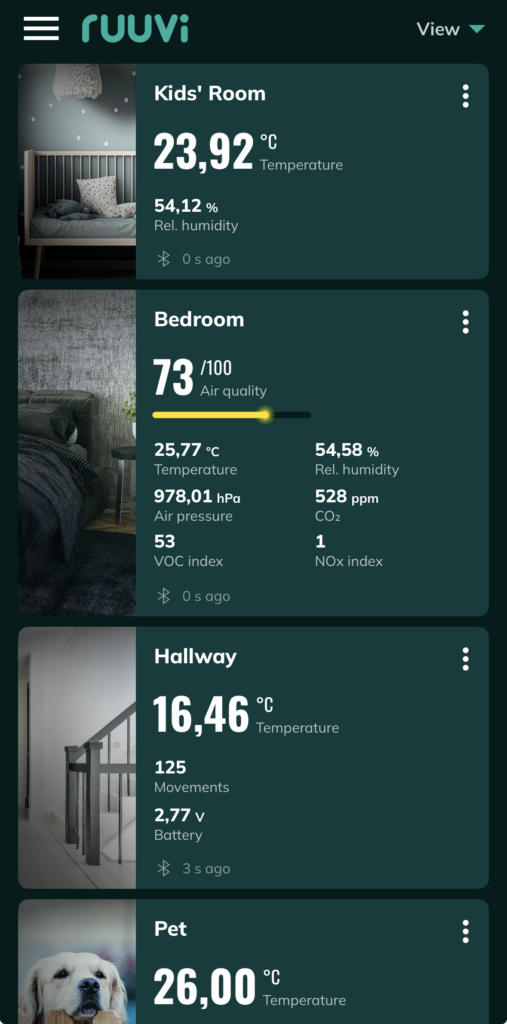
Practical ways to use Visible measurements at home
Customizing your sensor view is not just about aesthetics — it helps you react faster and make informed decisions. Here are a few everyday examples:
Keep the kids’ room consistently comfortable
For many parents, maintaining a healthy sleeping environment is a priority. By placing Temperature and Humidity at the top of the sensor card, you can instantly confirm that kids’ room conditions remain comfortable for both playtime and restful sleep.
Less critical measurements, such as pressure or motion, can be hidden to reduce visual clutter and keep your dashboard focused.
Protect food in your fridge or freezer (with RuuviTag)
Using a sensor in cold storage is a simple way to avoid unpleasant surprises. Set Temperature as the primary measurement and follow it with Battery level — because a powered sensor is a reliable sensor.
With a streamlined card, it becomes easier to spot sudden changes. Pair this setup with alerts for temperature and battery levels to add an extra layer of protection.
We recommend placing your RuuviTag on the middle shelf of the fridge, away from food items, walls, and direct air vents to ensure accurate, average readings. Avoid placing it in the very back, near the door, or on the floor, as these areas experience extreme temperature fluctuations. Also remember to choose a location where your sensor is protected from accidental liquid spills.
Stay ahead of basement humidity
Basements often experience higher moisture levels, which can affect stored belongings and indoor air quality. Prioritizing relative humidity, dew point, and pressure allows you to detect rising humidity at a glance.
Early awareness makes it easier to improve ventilation to keep the humidity levels under control and helps reduce the risk of mold growth — a small adjustment that can make a meaningful difference in maintaining a healthier home.
How to set up Visible measurements
Getting started takes less than a minute:
- Open Ruuvi Station and select a sensor.
- Go to Sensor settings → Visible measurements.
- Tap the + icon to add a measurement, or × to move it to hidden measurements list.
- Drag and drop items in visible measuruments list to arrange them in your preferred order.
- Return to the dashboard and enjoy a clearer, more focused view.
Your selections automatically apply to the full sensor view, chart order in the History tab, and alert configuration order — creating a seamless monitoring experience.
Helpful tips for smarter monitoring
- Customize each sensor individually so every space in your home highlights the data you care about most.
- If you share sensors through Ruuvi Cloud (requires a Ruuvi Gateway), your Visible measurements settings travel with the sensor — ideal for shared homes or collaborative monitoring.
- Review your visible measurements to improve your monitoring when needed.
A simpler way to stay informed
The Visible measurements feature is designed to make sensor data clearer, faster to interpret, and more relevant to your daily life. Whether you prefer a neatly organized dashboard or simply want important information available at a glance, this feature helps you tailor the experience to your needs.
Refine your view, reduce distractions, and let your sensors deliver insights that truly support a healthy and comfortable home environment.